Which AI model can you run on your own laptop? Measured on 16 GB, October 2026
Which AI model can you run locally on an ordinary 16 GB laptop? Qwen3.5 and Gemma 4 compared, with measured speeds, a step-by-step Ollama setup, tasks to start with and the two settings that make the most difference.


I asked an AI model on my laptop how many days there are between 1 March and 1 June. After 94 seconds came the answer: 92. Then I asked the same question to the same model on the same laptop, with one setting changed. This time the same answer came after 3.5 seconds.
That difference says a lot about local AI in 2026. Running a language model on your own laptop is no longer hard: install one program, type one command. Whether it is pleasant to use afterwards depends on a few choices hardly anyone tells you about. Which model fits in your memory? How much text may it keep in view at once? And should it think first or answer straight away?
This article is for anyone who wants to try it once. It is written for an ordinary laptop of today, with 16 GB of memory, with or without a separate graphics card. You will read which model to choose, how to install it, what to expect and how to avoid the biggest mistakes.
Facts checked on 9 October 2026. I measured the speeds in this article myself with Ollama 0.35.1 on my laptop: an Intel Core i9-13980HX with 16 GB of DDR5-5600 and an Nvidia RTX 4070 Laptop with 8 GB of video memory. For the measurements without a graphics card I switched the GPU off. File sizes come from Ollama's model library, other figures from the model cards. Back-of-envelope calculations are marked as such.
Which AI model should you choose for your laptop? The short answer
For most laptops with 16 GB, Alibaba's Qwen3.5 is the best choice in October 2026: the 4B version if your laptop has no separate graphics card, the 9B version if it has one or if you use a MacBook. Both are free, may be used commercially (Apache 2.0), understand Dutch and English, and can read images too.
| Your laptop | Start with | Command | What to expect |
|---|---|---|---|
| 16 GB, no separate graphics card (most Windows laptops) | Qwen3.5 4B (3.3 GB) | ollama run qwen3.5:4b | around 15 tokens per second, easy to read along with |
| 16 GB with a separate 8 GB GPU | Qwen3.5 9B (6.6 GB) | ollama run qwen3.5:9b | around 40 tokens per second, faster than you read |
| MacBook with 16 GB | Qwen3.5 9B (6.6 GB) | ollama run qwen3.5:9b | not measured; see the calculation further on |
| 8 GB of memory | Qwen3.5 2B (2.7 GB) | ollama run qwen3.5:2b | usable for short tasks, no more |
Turn thinking off for ordinary questions (--think=false, more on that below). What these choices mean and why they come out this way follows below.
What "running locally" means
A language model is a large file of numbers, the weights. For Qwen3.5 9B that file is 6.6 GB. A program such as Ollama loads the file into your laptop's memory and uses it to compute an answer word by word. Nothing goes to a server: after the download it also works without internet, on the train or on a plane.
That has three consequences you notice straight away. A question costs nothing, however often you ask it. What you type or paste stays on your laptop: Ollama states in its documentation that it does not see your prompts or data when you run models locally. And your laptop does the work, so the fan spins up and the battery drains faster.
One pitfall: Ollama also offers cloud models. You recognise them by cloud in the name, such as gemma4:cloud. They run on Ollama's servers, and you need to sign in to use them. If you want to stay local, pick a name without cloud.
Why memory decides which model fits
The number after a model name, 4B or 9B, is the number of parameters in billions. Each parameter is a number the model learned during training. At full precision each number takes 2 bytes. Qwen3.5 9B would then be 19 GB, and that is how that version is listed in Ollama's library. It does not fit in a 16 GB laptop.
That is why models for home use are compressed to about 4 bits per number. This is called quantisation. The default version of Qwen3.5 9B in Ollama (q4_K_M) is therefore 6.6 GB instead of 19. The model becomes slightly less accurate, but the difference is much smaller than the difference with a model half its size. A 9B model in 4 bits is therefore almost always a better choice than a 4B model at full precision.
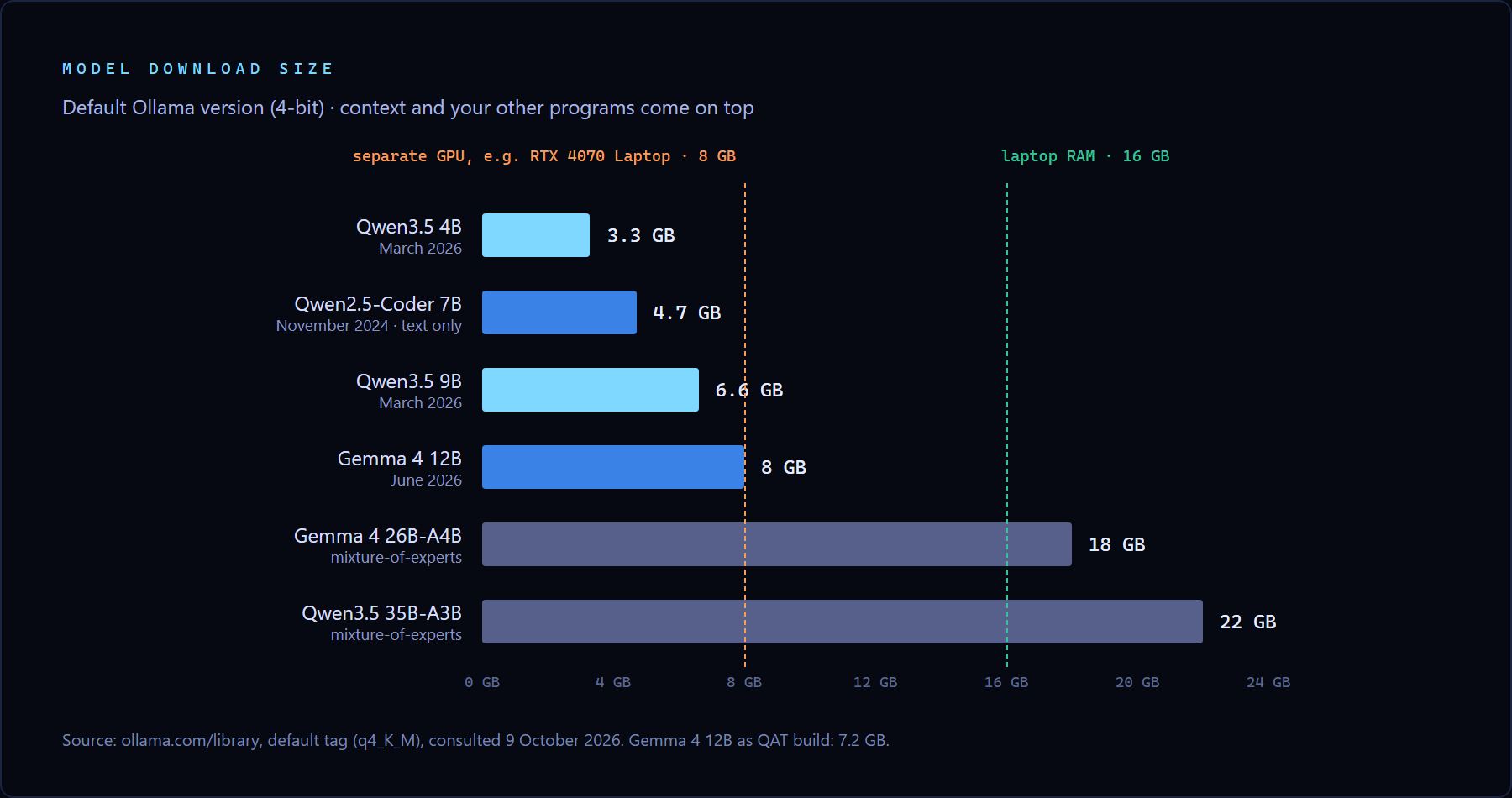
Fitting the file is not enough. Windows, your browser and everything else that is open use memory too. While I was writing this, my laptop had a code editor and a browser open, and of the 16 GB only 1.9 GB was free. If you then load a 6 GB model into RAM, Windows starts moving data to disk and everything slows down, not just the model. A practical rule of thumb: keep the model file below half of your RAM, and close the browser before you start. Task Manager (Ctrl+Shift+Esc, Performance tab) shows how much is free.
RAM, video memory and the Mac: three kinds of laptop
"16 GB" does not tell the whole story, because a laptop can compute in three ways. The difference matters more than which model you pick.
A laptop without a separate graphics card. This is the ordinary Windows laptop, including most Copilot+ laptops with an Intel Core Ultra, AMD Ryzen AI or Snapdragon X. Ollama computes on the processor there, with the model in ordinary RAM. As far as I could find, Ollama does not use the NPU, the AI chip those laptops are advertised with: Windows uses it for its own features, such as Live Captions. For language models, RAM is what counts here.
A laptop with a separate graphics card. Gaming laptops and heavier work laptops often have an Nvidia GPU with its own video memory, usually 6 or 8 GB. That memory is much faster than RAM, but also smaller. An RTX 4070 Laptop has 8 GB. In my measurements Ollama could use about 5.5 GB of it for the model: Windows kept the rest for the display, or Ollama reserved it as a margin. If the model does not fit entirely, part of it goes to RAM and the processor computes that part. That is always the slowest link.
A MacBook with Apple silicon. Processor and graphics chip share one memory. A MacBook Air with 16 GB can therefore use a large part of those 16 GB as video memory, and Ollama uses the graphics chip automatically. Since late 2024 all new MacBook Airs have at least 16 GB. That makes them a good middle ground for these models.
How fast is a local model? Measured
A language model writes in tokens: a word or part of a word. I had each model do the same task, a PHP function that validates a Dutch phone number, and measured how many tokens per second it wrote.
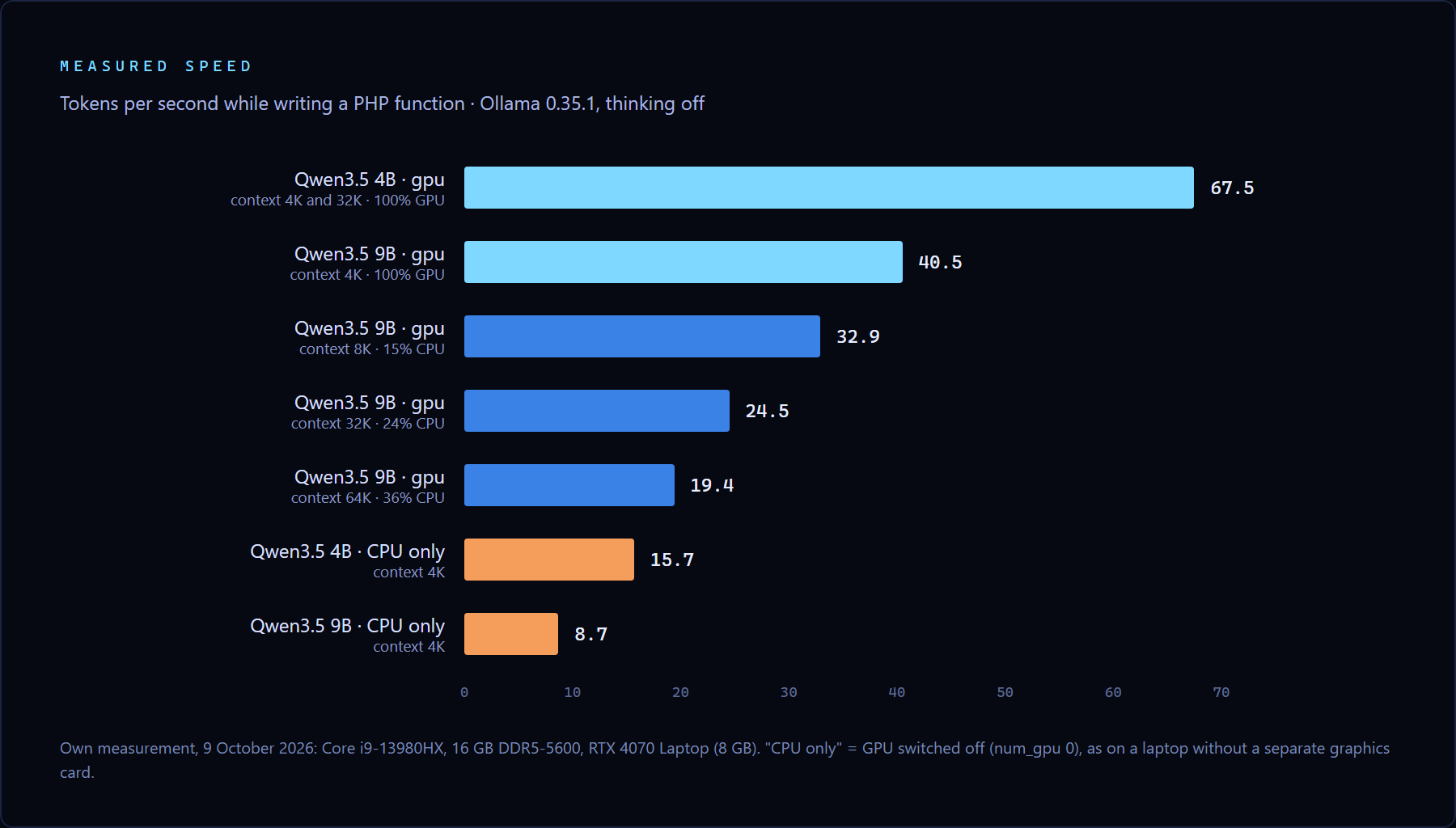
What those numbers mean in practice, as a back-of-envelope example: an answer of 500 tokens, roughly a solid paragraph with a piece of code, is done in 12 seconds at 40 tokens per second. At 15.7 tokens per second (4B without a graphics card) it takes 32 seconds. At 8.7 (9B without a graphics card) almost a minute.
On a laptop without a graphics card there is a second wait: the model first has to read your question. Without the GPU, Qwen3.5 9B read 62 tokens per second; with the GPU, 614. Paste a 3,000-token document, about four pages, and without a graphics card you wait some 48 seconds before the first word appears. With the GPU it is 5 seconds.
Why memory speed sets the pace
This is the detail most lists skip. For each new token, the model reads all its weights from memory once. For a 6 GB model that is 6 GB per token. The pace is therefore set mainly by how fast your memory can deliver data, and much less by how fast your processor is.
A calculation for my laptop: two DDR5-5600 memory modules deliver at most 89.6 GB per second together. Divided by the 6.2 GB the 9B model took in memory without the GPU, that gives an upper limit of about 14 tokens per second. I measured 8.7, about 60 percent of that. The video memory of the RTX 4070 Laptop does 256 GB per second. Divided by 5.6 GB that is an upper limit of 46 tokens per second, and I measured 40.5.
That lets you estimate the speed for your own laptop. Thin laptops with Intel Core Ultra 200V or Snapdragon X have LPDDR5X memory at around 135 GB per second, faster than the separate modules in my laptop. A MacBook Air with M4 does 120 GB per second. For Qwen3.5 9B the upper limit then comes to about 19 tokens per second, and in practice the speed will be well below that. This is a calculation, not a measurement.
Thinking mode: the same answer, 27 times the wait
Back to the question from the start. Qwen3.5 is a reasoning model: by default it writes out a train of thought before it answers. For the question about 1 March and 1 June, Qwen3.5 9B wrote 2,992 tokens of deliberation, which took 94 seconds. With thinking off it gave the same, correct answer in 3.5 seconds. Asked "What is 2+2?", the 4B model thought for 863 tokens before saying "4".
Thinking helps with sums that have a catch, logic puzzles and tricky bugs. For summarising, rewriting, translating or explaining, it is mostly waiting. On a laptop without a graphics card, at 9 tokens per second, those 3,000 tokens of thinking take more than five minutes.
This is how you switch it off:
ollama run qwen3.5:9b --think=falseTo see how fast the model is on your laptop, add --verbose. After each answer Ollama then shows, among other things, the "eval rate": the number of tokens per second.
The context window: why 256K on paper becomes 4K on your laptop
The context window is what the model can see at once: your question, the document you paste and the conversation so far, measured in tokens. Qwen3.5's page lists 256K for every version, more than 256,000 tokens, enough for a book.
On a laptop you get 4,096 by default. Ollama picks the window based on video memory: below 24 GB it is 4K, between 24 and 48 GB 32K, and only from 48 GB the full 256K. That is a sensible choice, because every extra token in the window costs memory. If the conversation grows beyond the window, the beginning drops out. The model then "forgets" what you said in your first message, without telling you.
My measurements show what a larger window costs on an 8 GB GPU. At 4K, Qwen3.5 9B fitted entirely in video memory, at 40.5 tokens per second. At 8K, 15 percent went to the processor and the pace dropped to 32.9. At 32K it was 24.5, at 64K 19.4. The 4B model stayed fully on the GPU at 32K and ran as fast as at 4K: 67.9 tokens per second. If you want long documents read on an 8 GB GPU, the smaller model with a large window serves you better than the larger model with a small one.
You can enlarge the window during a conversation:
/set parameter num_ctx 16384Then ollama ps in a second window shows how the model is loaded:
NAME          ID              SIZE      PROCESSOR          CONTEXT    UNTIL
qwen3.5:9b    56671c2ab938    7.3 GB    24%/76% CPU/GPU    32768      4 minutes from now
If PROCESSOR says 100% GPU, everything sits in video memory. A split such as 24%/76% CPU/GPU means part of it runs on the processor, and that costs speed. On a laptop without a graphics card it says 100% CPU. That is normal there.
One caveat for those who want to go further. Ollama's documentation says coding tools and agents need at least 64,000 tokens of context. An AI assistant that works through your project files on its own is therefore possible on a 16 GB laptop, but slow. For individual questions about code it works well.
The models that matter in October 2026
Qwen3.5 9B and 4B: the best all-rounders for 16 GB
Alibaba released the small Qwen3.5 models on 2 March 2026: 0.8B, 2B, 4B and 9B, under the Apache 2.0 licence. They read text and images, can call tools and, according to Alibaba, support 201 languages and dialects. According to the model card, the 9B version scores 65.6 on LiveCodeBench v6, a programming test. Qwen3-30B-A3B-Thinking, a 2025 model more than three times its size, scores 66.0. The 4B scores 55.8.
Newer Qwen generations do exist. Qwen3.6 and Qwen3.8 came out in 2026, but as far as I could find, their smallest open versions start at 27 billion parameters. For a 16 GB laptop, Qwen3.5 remains the newest generation that fits.
Google's Gemma 4: a good alternative, but larger than the name suggests
Google released Gemma 4 on 31 March 2026 and added a 12B version on 3 June. The small variants are called E2B and E4B. The E stands for "effective" parameters: the file is larger than the number suggests. Gemma 4 E4B is 6.6 GB in Ollama, as large as Qwen3.5 9B. The 12B is 8.0 GB, or 7.2 GB in the QAT version (gemma4:12b-it-qat), which was trained to cope with 4 bits.
On a 16 GB MacBook or a laptop without a graphics card you can safely try Gemma 4 12B. On an 8 GB GPU it does not fit entirely, and then what was said above about speed applies. If you want to compare two models side by side, Qwen3.5 9B and Gemma 4 12B are the pair to take.
Qwen2.5-Coder 7B: still often recommended, but from November 2024
Ask a chatbot which local model is good for programming and Qwen2.5-Coder 7B comes up a lot. It is a fine 4.7 GB model, but it is almost two years old, reads text only and has a 32K window in Ollama. If you program a lot, put it next to Qwen3.5 9B and give both the same task from your own work. Thirty minutes of trying it yourself is worth more than a list.
Too large for 16 GB: the mixture-of-experts models
You will come across models such as Qwen3.5 35B-A3B and Gemma 4 26B-A4B. The number after the A is the number of parameters active per token: 3 or 4 billion. Such mixture-of-experts models therefore compute about as fast as a small model. But all parameters must be in memory, and the files are 22 and 18 GB. That does not fit on a laptop with 16 GB of RAM. With 32 GB, these become the most interesting models to try.
Installing: from nothing to a first answer
- Download Ollama from ollama.com/download. It runs on Windows, macOS and Linux and is free.
- Open PowerShell (Windows) or Terminal (Mac) and type
ollama run qwen3.5:4b --think=false. The first time, the model is downloaded: 3.3 GB, or 6.6 GB for the 9B. - Type your question after
>>>and press Enter./byestops it. - Use
ollama psin a second window to see how the model is loaded. - Clean up if you like:
ollama listshows what you have downloaded, andollama rm qwen3.5:4bremoves a model. On Windows the models live inC:\Users\yourname\.ollama\models.
Rather avoid the command line? Ollama also has its own window to chat in. You can also use LM Studio, a program with a full graphical interface in which you search, download and configure models. Since July 2025 LM Studio is free for use at work too. On Windows it needs a processor with AVX2, on the Mac an Apple chip.
What you can do with it: five tasks to start with
Summarise a text you would not paste into a cloud service. A contract, a medical result or a personnel file stays on your own laptop. Start with a short text: the default 4K-token window holds a few pages, including the answer.
Summarise this email in three points and add what I need to do: [paste the text]Have an image described. Qwen3.5 reads images. Put the path to the file in your question. I had the 4B model describe the memory chart from this article. Within 14 seconds, including loading the model, it wrote that the two largest models are "out of reach" for a 16 GB laptop. That is correct.
Describe in two sentences what this chart shows. ./chart.pngHave code explained. Paste a function you do not understand and ask what it does, line by line. For explanations and small changes these models are good. For changes across a whole project they fall short.
Rewrite and translate without internet. Make a business email friendlier, put a text into another language, have an Excel formula explained. Short tasks like these take half a minute even without a graphics card.
Call the model from your own code. Ollama runs a small web server on your laptop, on port 11434. Any program can call it. I tested this PHP example:
<?php
$request = [
    'model'  => 'qwen3.5:4b',
    'prompt' => 'Summarise in one sentence: the meeting on Tuesday has been moved to Thursday at 2 pm, room 3.',
    'stream' => false,
    'think'  => false,
];

$context = stream_context_create(['http' => [
    'method'  => 'POST',
    'header'  => 'Content-Type: application/json',
    'content' => json_encode($request),
]]);

$answer = json_decode(file_get_contents('http://localhost:11434/api/generate', false, $context), true);
echo $answer['response'];
The answer was: "The meeting originally scheduled for Tuesday has been rescheduled to take place on Thursday at 2 pm in Room 3." Correct, and a little stiff. That is a fair picture of a model with 4 billion parameters.
What not to expect from a local model
A 9-billion-parameter model is not Claude, GPT or Gemini. The size of most cloud models is secret, but Mistral Large 4 has a trillion parameters: more than a hundred times as many. You notice the difference mainly in long reasoning, in factual knowledge and in large programming tasks. A local model also knows nothing about what happened after its training and cannot search the internet. Ask about recent news or precise facts and it may confidently make something up. Use it for work where you can check the result yourself: summarising, rewriting, explaining, first drafts.
Problems you will run into, and the fix
| What you see | Likely cause | What to do |
|---|---|---|
| The answer takes long to start, then comes quickly | thinking mode is on | start with --think=false |
| Everything is slow, even once the model is writing | the model runs partly on the processor | check with ollama ps; pick a smaller window or a smaller model |
| The whole laptop stutters | RAM is full and Windows is using the disk | close the browser, or take the 4B model |
| The model forgets what you said earlier | the conversation is larger than the context window | enlarge the window with /set parameter num_ctx or start a new conversation |
| The battery drains fast | the model is working processor and GPU hard | keep the charger plugged in |
Where to start today
Install Ollama, type ollama run qwen3.5:4b --think=false and ask the question you would never paste into a cloud chatbot. If that works for you and you have a graphics card or a MacBook, try the 9B. When in doubt, read ollama ps.
One thing struck me most while measuring. The choice of model made less difference than the two settings almost nobody changes. With thinking on, I waited 94 seconds for an answer that could have taken 3.5. And a 32K window made the same model 40 percent slower. On an ordinary laptop, the model you keep using is not the smartest one, but the one you set up well.
Sources
- Ollama, Qwen3.5 versions and file sizes, Gemma 4 versions and Qwen2.5-Coder versions (consulted 9 October 2026)
- Ollama, Context length: default window per amount of video memory and the 64,000 tokens for coding tools
- Ollama, FAQ (num_ctx, storage location, privacy) and Cloud models
- Qwen, Qwen3.5-9B model card: architecture, licence and LiveCodeBench scores
- Google, Gemma releases: dates of Gemma 4 and Gemma 4 12B
- LM Studio, LM Studio is free for use at work (8 July 2025) and system requirements
- Nvidia, GeForce RTX 40 laptops: 8 GB of GDDR6 for the RTX 4070 Laptop
- Own measurements, 9 October 2026: Ollama 0.35.1, Core i9-13980HX, 16 GB DDR5-5600, RTX 4070 Laptop


