Claude Code Mastery 2026
Master Claude Code with context, Plan Mode, Ultrathink, sub-agents, and workflow automation for faster and smarter AI-driven development.

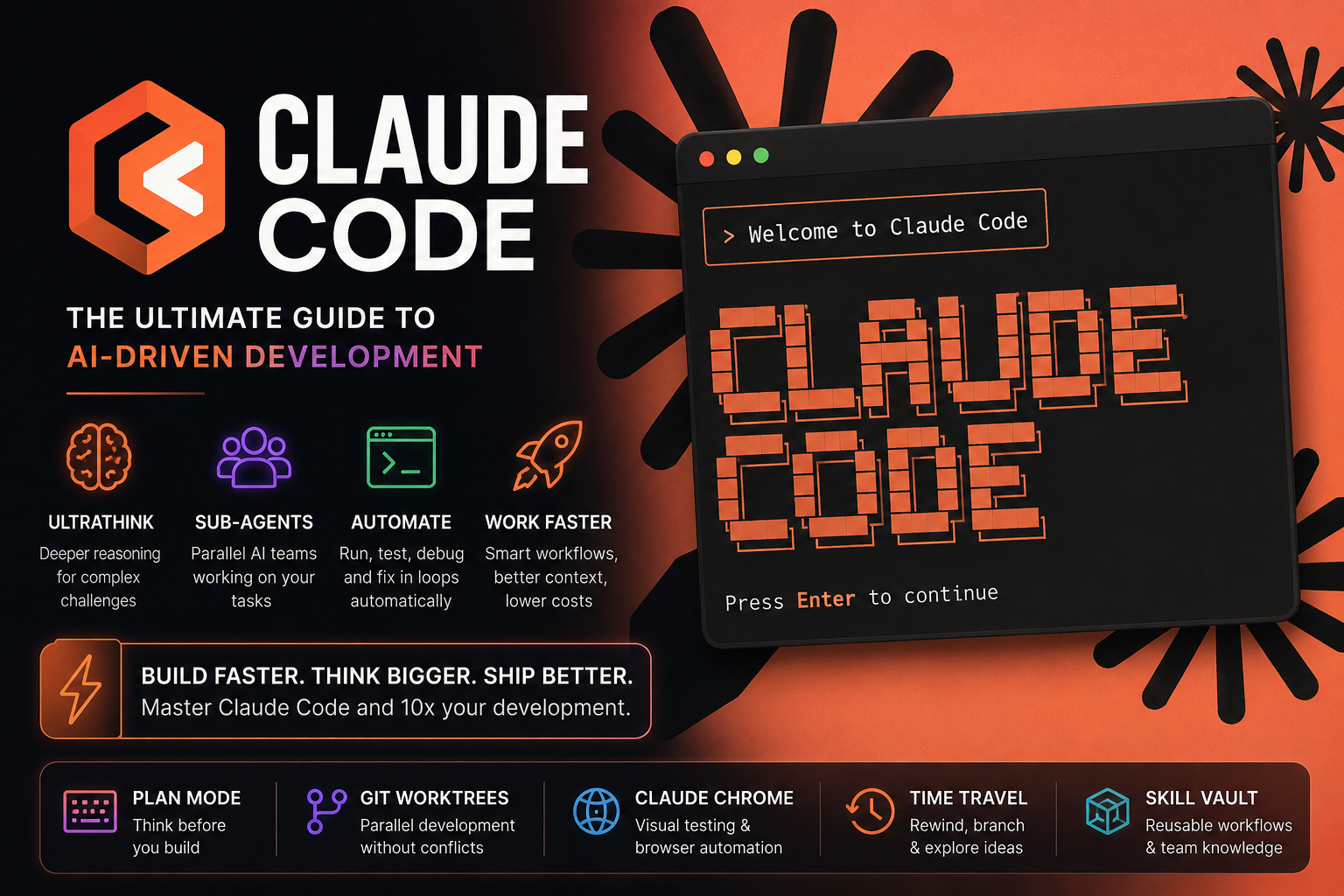
Claude Code Mastery 2026: The Ultimate Power Guide for AI-Driven Development
Claude Code is not an AI chatbot. It is a fully AI-driven development operating system. Most developers only use about 5% of its capabilities. They type simple prompts, get some code back, and move on. But beneath the surface lies a system capable of designing architectures, simulating parallel engineering teams, debugging autonomously, validating its own output, and orchestrating complete development workflows.
In this massive deep dive, you’ll discover:
- Hidden Claude Code features
- Advanced prompting techniques
- Ultrathink & extended reasoning workflows
- Sub-agents and parallel development
- Massive token optimization strategies
- Self-healing debug loops
- Claude Chrome browser automation
- Git worktree AI engineering teams
- Plan Mode architecture workflows
- Context engineering at expert level
- And dozens of practical power-user examples
This article is based on official Anthropic documentation, advanced community workflows, reverse-engineered Claude Code techniques, and the latest discoveries from 2025 and 2026.
1. What Claude Code Actually Is (And Why Most People Use It Wrong)
Most people treat Claude Code like ChatGPT inside a terminal.
That’s like using a Formula 1 car to buy groceries.
Claude Code was designed as an agentic development environment.
That means it can:
- Read your entire codebase
- Understand architecture patterns
- Execute terminal commands
- Debug independently
- Use tools autonomously
- Plan multiple steps ahead
- Reason between actions
Anthropic explicitly describes Claude Code as an autonomous engineering agent rather than a traditional chatbot.
Once you understand this, your workflow changes completely.
2. The Perfect Start: /init and the claude.md Memory Layer
The very first mistake most developers make:
They immediately start prompting.
Never do that.
Step 1: Always Run /init
/initClaude will scan:
- Project structure
- Frameworks
- Dependencies
- Build systems
- Architecture
- Conventions
- Patterns
Then it generates:
claude.mdThis file becomes your AI memory layer.
Think of it as:
- An architecture guide
- A coding constitution
- Project DNA
- A persistent engineering brain
A Bad claude.md
# Laravel project
Uses MySQL
Frontend uses React
A Great claude.md
# Architecture

- Laravel 12 backend
- React + Vite frontend
- Repository pattern enforced
- Service layer required for business logic
- No direct DB queries in controllers

# Standards

- Strict typing everywhere
- DTOs required for API responses
- Prefer composition over inheritance

# Frontend

- Zustand for state management
- Tailwind utility-first approach
- Avoid inline styles

# Critical Rules

- Never modify billing logic without tests
- Always run Pest tests after auth changes
- Use feature flags for risky deployments
Pro Tip: Use References Instead of Bloating Context
# Additional Documentation

See:
- docs/frontend-styleguide.md
- docs/database-rules.md
- docs/deployment-process.md
This keeps context compact and token-efficient.
3. Context Engineering: The Real Secret Weapon
The biggest limitation in AI is not intelligence.
It’s context pollution.
Anthropic has confirmed that performance degrades significantly when context windows become overloaded.
Use These Aggressively
/clear
/clearUse it:
- After every feature
- After debugging sessions
- When Claude starts hallucinating
- When context becomes noisy
/compact
/compact keep database schema and auth flowClaude compresses the conversation while preserving critical context.
/context
Displays exactly:
- Where tokens are being consumed
- Which files are expensive
- How much tool output costs
The Golden Rule
A clean context with excellent instructions is better than a massive context filled with irrelevant history.
4. Ultrathink, Effort Levels & Extended Thinking
This is where Claude Code becomes genuinely insane.
Ultrathink
Many developers assume ultrathink is just a meme.
It isn’t.
It’s a real reasoning trigger that activates deeper analysis behavior.
Example
ultrathink analyze this authentication architecture and identify every scaling bottleneckPerfect for:
- Complex refactors
- Architecture reviews
- Performance analysis
- Security auditing
- Hard debugging problems
When NOT to Use It
- Simple CRUD changes
- CSS tweaks
- Minor refactors
- Renaming variables
Because it increases:
- Reasoning tokens
- Latency
- Cost
/effort
/effort low
/effort medium
/effort high
/effort max
Recommended Workflow
| Task | Effort Level |
|---|---|
| Minor edits | low |
| Daily development | medium |
| Complex debugging | high |
| Architecture & refactors | max + ultrathink |
5. Plan Mode: Why Elite Developers Think Before They Build
One of Claude Code’s most powerful capabilities:
Shift + Tab → Plan ModeClaude will:
- Avoid modifying files
- Analyze architecture
- Identify risks
- Explain trade-offs
- Create execution plans
Best Workflow
Step 1
Plan a migration from Laravel monolith to modular architecture ultrathinkStep 2
Review everything critically.
Step 3
Only then start implementation.
Bad plans always produce bad AI-generated code.
6. The 95% Confidence Rule (Absolute Game Changer)
Add this to complex prompts:
Ask me clarifying questions until you are 95% confident you can complete this successfully.This massively reduces:
- Hallucinations
- Bad assumptions
- Incorrect architecture decisions
- Expensive rewrites later
Bad Prompt
Build a CRM systemGood Prompt
Build a CRM system.

Ask me clarifying questions until you are 95% confident you can complete this successfully.
7. Use Claude Like a Senior Architect — Not a Typing Machine
Weak prompt:
Create a login formPower prompt:
What is the best authentication architecture for a multi-tenant SaaS platform with enterprise SSO requirements?This activates:
- Reasoning
- Trade-off analysis
- System thinking
- Architecture intelligence
8. Devil’s Advocate Mode
One of the strongest prompting techniques ever:
Destroy this architecture.
Identify every weak assumption,
security risk,
scaling issue,
and future bottleneck.
Claude becomes brutally critical.
This prevents:
- Fragile systems
- Hidden scalability problems
- Bad abstractions
- Technical debt disasters
9. Sub-Agents: Turn Claude Into an Entire Engineering Team
This is where things become truly next-level.
Claude can coordinate multiple sub-agents.
Example
Use sub-agents.

One analyzes performance.
One reviews security.
One checks test coverage.
One evaluates database scaling.
This creates:
- Parallel reasoning
- Specialized analysis
- Far deeper output quality
10. Git Worktrees: Parallel AI Development
An elite-level workflow.
Use Git worktrees to run multiple Claude instances simultaneously.
Example
- Claude Instance 1 → Authentication
- Claude Instance 2 → Dashboard UI
- Claude Instance 3 → API optimization
- Claude Instance 4 → Testing
All in parallel.
This massively increases development velocity.
11. Batch Mode: Massive Parallel Refactoring
/batchAllows large-scale simultaneous changes.
Example
/batch migrate all forms to new design systemPerfect for:
- Design system migrations
- Framework upgrades
- Tailwind migrations
- API refactors
12. Claude Chrome: Browser Automation + Visual QA
One of the most underrated capabilities.
Claude Chrome can:
- Open websites
- Click buttons
- Fill forms
- Test user flows
- Detect UI bugs
- Self-correct issues
Example Workflow
Start claude-chrome

Test the onboarding flow.
Fix any broken UI issues.
Continue until onboarding works perfectly.
It feels like having an autonomous QA engineer and frontend developer working together.
13. Screenshot-Driven Development
Claude is remarkably strong at visual reasoning.
Use screenshots for:
- Error debugging
- UI cloning
- UX analysis
- Layout optimization
Example
Analyze this dashboard screenshot.
Rebuild it in React + Tailwind.
Improve spacing and hierarchy.
14. Self-Healing Debug Loops
This is where AI development starts feeling magical.
You can instruct Claude to:
- Run tests
- Read failures
- Fix issues automatically
- Retest
- Repeat until stable
Example
Run all tests.
Fix failures automatically.
Repeat until all tests pass.
15. /advisor: Smart Escalation to Stronger Models
Modern Claude Code versions support:
/advisorWorkflow:
- Daily work → cheaper model
- Complex problem → automatic escalation
This gives you:
- Lower costs
- Faster workflows
- Deep analysis only when needed
16. Voice Mode: Talk Directly to Your IDE
/voiceYou can literally say:
“Analyze this controller, move business logic into services, and optimize the database queries.”
Voice-first development workflows are becoming increasingly popular among senior engineers.
17. Remote Control: Run AI Development From Your Phone
/remote-controlThis allows you to:
- Launch long-running jobs
- Control Claude remotely
- Monitor builds from mobile
- Manage autonomous agents anywhere
Combine this with:
- VPS infrastructure
- tmux sessions
- Persistent cloud terminals
And you essentially have a 24/7 AI engineering machine.
18. Time Travel: /rewind and /branch
Claude Code literally supports timeline manipulation.
/rewind
/rewindReturn to earlier conversation states.
/branch
/branchFork alternative ideas without polluting your main workflow.
19. Skill Vaults: Build Your Own AI Superpowers
.claude/skillsStore reusable workflows as modular skills.
Examples
- Laravel security audits
- React performance reviews
- SEO optimization pipelines
- Database migration analyzers
- API documentation generators
You are effectively building your own AI engineering framework.
20. The Biggest Mistakes Developers Make
1. Context overload
Context rot destroys output quality.
2. Weak prompts
Vague input always produces vague output.
3. Skipping Plan Mode
Poor planning leads to poor AI code.
4. No validation loops
AI still hallucinates.
5. Running everything at max effort
Huge token waste.
6. Ignoring sub-agents
You’re wasting massive parallel reasoning capacity.
21. The Elite Claude Code Workflow
Step 1
/initStep 2
Optimize claude.md
Step 3
Shift + Tab → Plan ModeStep 4
ultrathinkStep 5
Deploy sub-agents
Step 6
Run automated validation
Step 7
Use Claude Chrome for visual verification
Step 8
/clearReset context after every major feature.
22. The Future of Software Development
Claude Code demonstrates something fundamental:
The role of developers is shifting from:
- Writing code manually
To:
- System design
- Context engineering
- AI orchestration
- Validation automation
- Strategic architecture thinking
The best developers of the next decade won’t necessarily be the fastest typists.
They’ll be the people who can:
- Structure complexity
- Guide AI systems effectively
- Build scalable workflows
- Automate reasoning pipelines
- Think architecturally
Final Thoughts
Claude Code is not an “AI assistant.”
It’s an entirely new development paradigm.
The real power emerges when you:
- Master context engineering
- Use Plan Mode strategically
- Deploy Ultrathink intelligently
- Coordinate sub-agents
- Automate validation loops
- Leverage Git worktrees
- Build reusable AI skills
At that point, Claude stops behaving like a chatbot.
And starts operating like a complete AI engineering organization.
References & Sources
- Anthropic Claude Code Best Practices
- Claude Code Community Research
- Ultrathink Reverse Engineering Studies
- Advanced AI Engineering Workflows
- Claude Chrome Automation Research